A rejected CSV file is different from a file with rejected rows
Learn when the fixed USD CSV checker stops on a fatal file error and when it reports rejected rows with accepted-only totals.
A fatal file error
A fatal error means the checker cannot process the file as the fixed format. For example, the expected header is exactly date,pair,gross,costs,notes in that order. A missing, extra, renamed or reordered column makes the file fatal; malformed CSV and files above 1 MiB also stop processing. A fatal file has no row totals, accepted export or reconciliation report.
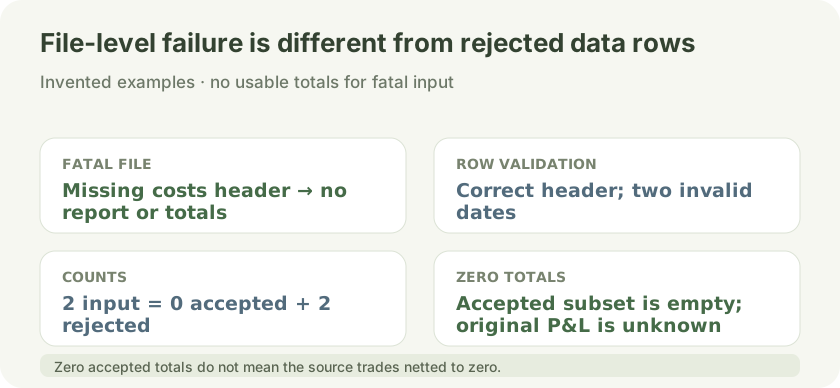
A missing costs header makes a file-level fatal error with no report. With a valid header, two invalid-date rows produce zero accepted and two rejected; zero accepted-subset totals do not establish the source trades' profit or loss.
Open full-size diagram ↗Rejected rows
When the header and CSV structure are usable, each data row is checked. Invalid dates, pair formats, amount formats, negative costs, wrong field counts and rows whose net exceeds the supported limit can be rejected individually. Other valid rows can still be accepted. The report and totals cover accepted rows only.
Two invented failure cases
An invented file with the header date,pair,gross,notes is fatal because costs is missing; no reconciliation report is available. A different invented file has the correct date,pair,gross,costs,notes header and two rows whose dates are invalid. That file has 2 input rows, 0 accepted and 2 rejected, with accepted-only gross, costs and net all 0 cents. These zeros describe the accepted subset, not the financial result of the original file.
What zero totals mean
Zero accepted-only totals mean that the accepted subset contributes zero. They do not establish that the original trades had zero profit or loss: rejected rows were excluded and their values were not included in those totals. Review the rejection details, correct the source data, and run the checker again.
What the fixed checker expects
The checker is USD-only: use real YYYY-MM-DD dates, uppercase AAA/BBB pairs, dot-decimal amounts with at most two decimal places, and nonnegative costs. Rows must be already closed and aggregated, with gross excluding the costs subtracted. There is no currency conversion and no fill matching. This is a formatting and arithmetic check, not financial advice or a recommendation to trade.
If your columns differ
The public checker uses one exact fixed layout and does not guess columns or formats. A separate offline demo in the public checker describes a declared custom mapping: its fields, date order, gross or net meaning, and fee signs must be specified. That does not promise custom mapping availability, a price, or an order. Use invented examples only; do not send trading files, records, account identifiers or credentials.
Next steps
Check the fixed layout at /tools/csv-journal-checker. If it does not fit, use /csv-format-request.txt to describe the format with invented examples, then use /contact?source=csv-format-fit to ask about fit. No response time or delivery is promised.
Sources and conventions
Examples are hypothetical. Arithmetic follows the formulas documented in our methodology. Broker contract specifications determine actual lot, margin and execution conditions. These sources document definitions and data; a source link does not imply endorsement of SanForex or a trading service.
These materials are prepared with AI assistance and checked against worked examples and deterministic calculation tests where applicable. They are not an expert suitability assessment or investment advice.
Open trade csv checker tool ↗