Why a USD CSV checker rejects commas, exponents and excess decimals
Learn which USD amount strings the CSV journal checker converts to exact cents, what it rejects, and how to investigate a rejected value without changing it silently.
What the checker accepts
The fixed checker expects exactly these columns in order: date,pair,gross,costs,notes. Dates must be real YYYY-MM-DD dates, pairs uppercase AAA/BBB, and amounts dot-decimal USD values with at most two decimal places. Costs must be nonnegative. The file limit is 1 MiB and 1,000 data rows. Amounts are parsed to integer cents; the checker does not infer currency from a number.
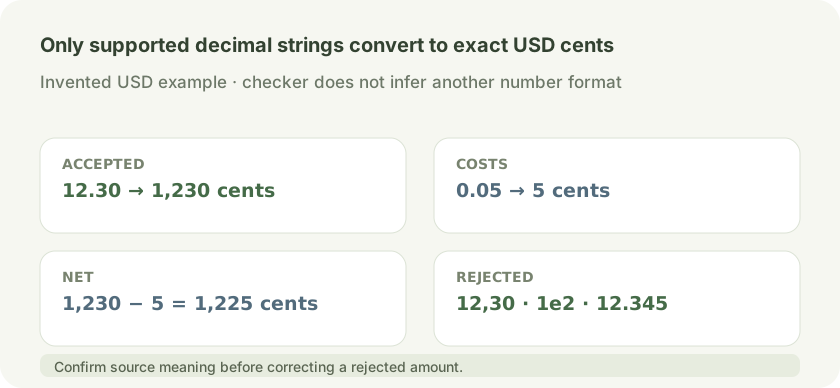
USD 12.30 and 0.05 map to 1,230 and 5 cents, net 1,225 cents. Decimal-comma 12,30, exponent 1e2 and excess-precision 12.345 are rejected.
Open full-size diagram ↗Why some amount strings fail
Accepted amount text uses digits with an optional dot and one or two fractional digits, with an optional leading minus sign. Values such as 12,30, 1e2 and 12.345 fail validation. Do not replace punctuation or round a value by guesswork. Confirm the source format and intended value first, then make any correction in the source data or an explicitly reviewed copy.
Invented amount strings
For an invented closed USD row, gross 12.30 and costs 0.05 become 1230 and 5 integer cents, giving net 1225 cents. The amount strings 12,30, 1e2 and 12.345 are rejected by this checker; it does not silently reinterpret a decimal comma, scientific notation or excess precision. Confirm the source format before changing any rejected value.
Keep the row meaning clear
Use USD-only, already closed and aggregated rows. The fixed checker performs no currency conversion and no fill matching. Enter gross before costs, with costs as a nonnegative amount to subtract; do not include costs in gross and then subtract them again. It validates row structure and arithmetic, not whether a file is complete or an authoritative account statement.
Read totals with care
Totals include accepted-only totals: a rejected row is excluded from accepted rows and their totals. Review rejected rows alongside the report before drawing conclusions about the input file. The normalized output contains accepted rows; it is not a repair of rejected values.
Fixed format and custom mapping
The public checker uses its fixed header and format. The source also defines validation for a declared custom mapping profile, including explicit column names, date and pair formats, USD currency, status, amount meaning and fee sign. That behavior does not promise that a custom mapping is available as a public service. Numeric amounts cannot establish currency, and arbitrary broker mapping or fill joining is not provided by the fixed checker.
Choose a next step
Try the fixed format at the CSV Journal Checker link. If your column layout differs, review the CSV Format Request and describe the structure using invented examples only; the request instructions say no quote, availability, automatic reply or response time is promised. Use the Contact form link for that request. Do not send trading files, account identifiers or credentials.
Sources and conventions
Examples are hypothetical. Arithmetic follows the formulas documented in our methodology. Broker contract specifications determine actual lot, margin and execution conditions. These sources document definitions and data; a source link does not imply endorsement of SanForex or a trading service.
These materials are prepared with AI assistance and checked against worked examples and deterministic calculation tests where applicable. They are not an expert suitability assessment or investment advice.
Open trade csv checker tool ↗