London and New York Forex hours: check the DST transition weeks
A practical way to check the indicative London–New York weekday overlap when daylight saving changes on different dates, and to verify a calendar date without assuming broker availability.
Why the overlap shifts
London and New York each use their own local time zone and change clocks on different dates. During the weeks between those changes, the UTC time of one city's local session shifts relative to the other's. The tool uses Europe/London and America/New_York time-zone rules, so it follows those local clock changes rather than assuming one fixed UTC offset.
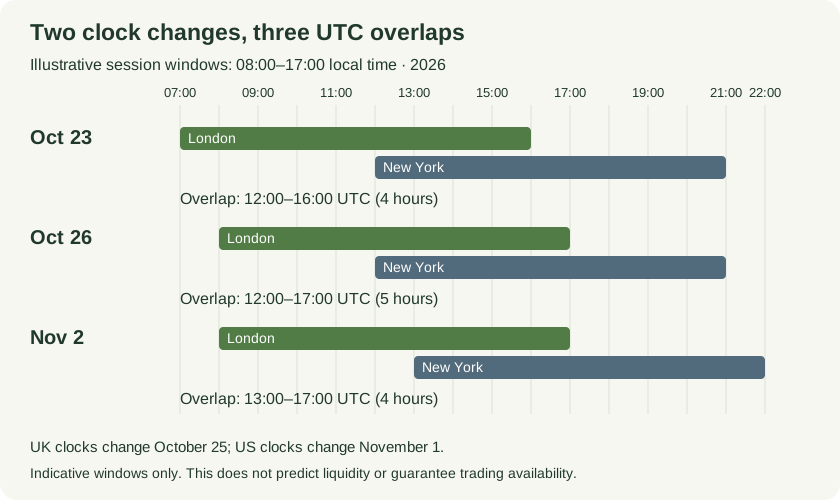
Using indicative 08:00–17:00 local windows in 2026, London–New York overlap is 12:00–16:00 UTC on October 23, 12:00–17:00 on October 26 and 13:00–17:00 on November 2.
Open full-size diagram ↗What the clock shows
The market-hours tool displays the current UTC time and indicative local weekday sessions. Its London and New York windows are 08:00 inclusive to 17:00 exclusive, Monday through Friday. It updates the current clock; it has no historical date picker or date-based calculator. These are indicative windows, not a promise of market access or tradability.
An invented calendar-check worksheet
Use invented planning entries for three real calendar dates, with indicative 08:00–17:00 local windows for both cities. On Friday 23 October 2026, London is 07:00–16:00 UTC and New York is 12:00–21:00 UTC, giving a 12:00–16:00 UTC overlap of 4 hours. On Monday 26 October, London is 08:00–17:00 UTC while New York remains 12:00–21:00 UTC, giving 12:00–17:00 UTC and 5 hours. On Monday 2 November, New York becomes 13:00–22:00 UTC, giving 13:00–17:00 UTC and 4 hours. These indicative windows omit holidays and broker interruptions; overlap is not evidence of liquidity or a reason to trade.
Check a date without a fixed offset
For another date, write down the date and the local 08:00 and 17:00 boundaries for each city. Convert each boundary using that city's date-specific time-zone rule, then take the later opening time and earlier closing time as the overlap; if the closing time is not later than the opening time, there is no overlap. A dated worksheet avoids carrying a single UTC offset across a daylight-saving transition. Check the relevant official clock-change calendars for the dates, and verify any broker's own schedule separately.
Limits to keep in mind
Weekday windows are indicative. Public holidays and broker-specific interruptions are excluded, and session overlap does not establish liquidity or guarantee that an instrument is tradable. This guide explains a calendar check; it does not recommend when to trade or provide investment advice. The tool is for current time only, so use a dated worksheet for a past or future calendar date.
Sources and conventions
Examples are hypothetical. Arithmetic follows the formulas documented in our methodology. Broker contract specifications determine actual lot, margin and execution conditions. These sources document definitions and data; a source link does not imply endorsement of SanForex or a trading service.
These materials are prepared with AI assistance and checked against worked examples and deterministic calculation tests where applicable. They are not an expert suitability assessment or investment advice.
Open market hours tool ↗